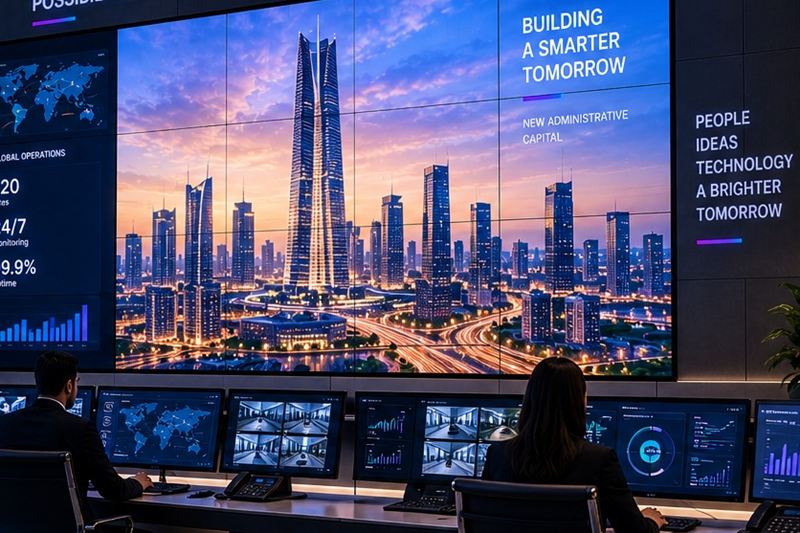
A video wall is a group of professional displays tiled into one large screen and driven by a controller, so it can show one huge image or many sources at once: camera feeds, dashboards, maps, TV channels and computer screens, in any layout. Video walls run control rooms and command centres, and they also carry brand content in lobbies, showrooms and malls.
Across Egypt, more rooms need one every year: operations centres for new cities and utilities, security and traffic control rooms, bank and telecom network centres, and headquarters that want a lobby wall visitors remember. This guide covers the first decision, LCD or LED, how big the wall should be, what the controller does and what it takes to run a wall around the clock.
LCD or LED: the first decision
Most video walls are built from one of two technologies.
- LCD video walls use professional flat panels with very thin bezels, tiled together. They give a sharp picture at close range and a lower cost for detailed content, but there is always a thin seam between panels.
- LED video walls are built from LED modules with no seams at all. They can be very bright, scale to almost any size and shape, and their sharpness depends on the pixel pitch: the distance between neighbouring LEDs.
| LCD video wall | LED video wall | |
|---|---|---|
| Seams | Thin bezel lines between panels | None, one continuous image |
| Viewing distance | Close: operator desks and meeting rooms | Depends on pixel pitch; fine pitch for closer viewing |
| Brightness | Good for indoor rooms | Higher; suits bright lobbies and large spaces |
| Small text and dashboards | Very sharp at close range | Sharp only with a fine enough pitch |
| Size and shape | Fixed grid of panels | Almost any size, ratio or curve |
| Typical use | Control rooms and operations centres | Lobbies, showrooms, large halls and outdoor |
Many control rooms still choose LCD because operators sit close and read small text all day, although fine-pitch LED is spreading where budgets allow. Lobbies and large halls often choose LED, because seams would break the brand image and the wall is seen from further away.
How big should the wall be?
Start from the people, not the wall. Ask what the furthest operator or visitor must be able to read, and from where.
- Viewing distance - for LED, a common rule of thumb is that the closest comfortable viewing distance in metres is roughly the pixel pitch in millimetres. A 1.5 mm pitch works from about 1.5 m; a 4 mm pitch needs viewers further back.
- Content - a single brand film can be large and coarse; a wall of dashboards and camera feeds needs enough pixels for small text.
- Sources at once - count how many feeds must be visible together at the busiest moment, then give each one a readable window.
- The room - ceiling height, structure, ventilation and where daylight falls decide what physically fits.
The controller is half the system
The panels show the picture; the controller decides what goes where. A good video wall controller takes inputs from cameras, dashboards, TV feeds and computers, places any source in any window, and switches the whole wall between saved layouts with one touch: daily operations, incident mode, presentation. In a control room, the controller is what lets the shift lead put a camera feed on the big screen within seconds when something happens.
What a 24/7 control room needs
- Panels rated for continuous use - consumer screens are not built to run all day, every day. Use displays specified for 24/7 duty.
- Redundancy - backup power supplies, a spare controller path and a UPS, so one failed part does not blank the wall during an incident.
- Cooling and ventilation - walls produce heat, and Egyptian summers add more. Plan room cooling and airflow behind the wall from day one.
- Sightlines and comfort - operators should see the wall without turning their heads all shift, and still use their desk screens comfortably.
- Remote monitoring - panel health, inputs and layouts watched centrally, so a fault is found before the next shift complains.
- Service access - front-serviceable mounts or enough space behind the wall, so a panel can be replaced without taking the wall apart.
Lobby and retail walls
A lobby wall is closer to a stage than to a control room. It is viewed from further away, often in bright daylight, and it carries brand films, announcements and live data. Brightness, seamless LED and a content plan matter more here than dozens of inputs. Content should be scheduled and updated from a CMS, or the most expensive screen in the building ends up showing last year's video.
How to plan a video wall
- Write down who will use the wall and what they must see from their seats.
- Measure the room: wall size, ceiling height, structure, daylight and viewing distances.
- Choose LCD or LED, and the pixel pitch, from the viewing distance and the content.
- List every source and the layouts you need: daily operations, incident and presentation.
- Specify the controller, redundancy, UPS and cooling.
- Design the mounting structure with service access.
- Commission the wall, train the operators and agree a maintenance plan.
How it connects to the rest of the building
A control room wall usually shows surveillance feeds and dashboards, runs on the building's network, and sits inside a wider AV and ELV design. Our AI CCTV guide covers the camera side, and our digital signage guide covers content for screens in public spaces.
Where QAVENIX fits
QAVENIX video walls are engineered end to end: ultra-narrow bezel professional panels rated for 24/7 operation, multi-source controllers with preset layouts, control room design that covers sightlines, redundancy and operator workflow, and remote monitoring of health, inputs and layouts. The wall can connect to the surveillance, analytics and AV systems we deliver, seamless LED walls come through our digital and LED solutions, and our engineers handle the mounting structure, cabling, commissioning and long-term support.
Frequently asked questions
What is a video wall?
A video wall is several professional displays tiled into one large screen and driven by a controller. It can show one large image or many sources at once, such as camera feeds, dashboards and computers, and is used in control rooms, lobbies, showrooms and retail.
Is an LED or LCD video wall better?
It depends on viewing distance, brightness and content. LCD walls are sharp at close range and suit control rooms where operators read small text, but they have thin seams. LED walls are seamless, brighter and scale to any size, but need a fine pixel pitch for close viewing.
How big should a video wall be?
Size it from the people who use it: what they must read and from how far. For LED, a common rule of thumb is that the closest comfortable viewing distance in metres is roughly the pixel pitch in millimetres. Then count the sources that must be visible together.
Can a video wall run 24/7?
Yes, if it is built for it: panels rated for continuous use, redundant power and a UPS, proper cooling, remote monitoring and a maintenance plan. Consumer TVs mounted as a wall are not designed for round-the-clock operation.